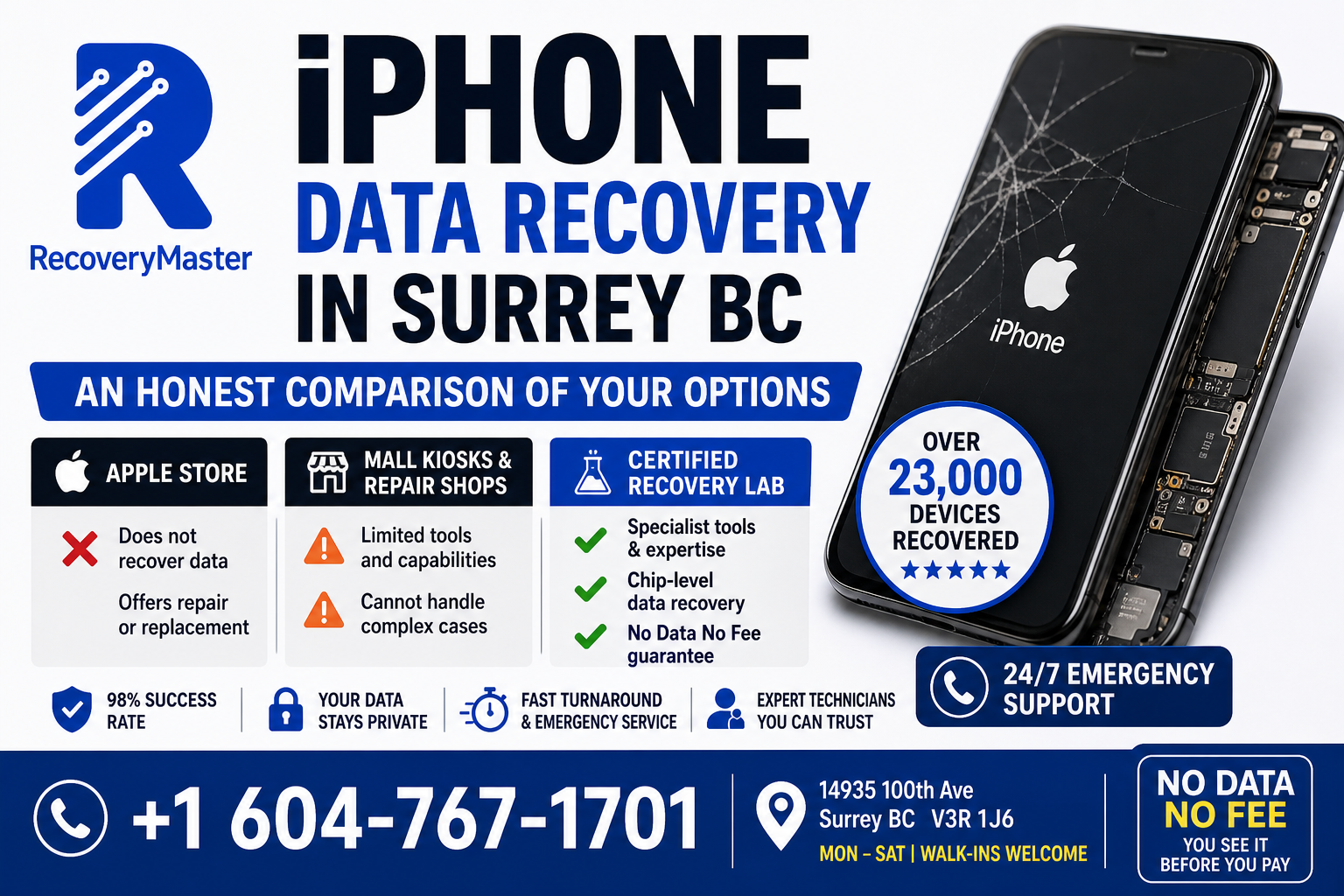
If your iPhone has stopped working and you’re trying to figure out where to go for data recovery in Surrey BC, here’s the honest answer: Apple Stores do not recover data, mall repair kiosks rarely have the tools required, and a certified local recovery lab is almost always your best option.
That’s not a sales pitch — it’s just how iPhone data recovery actually works, and most people don’t find this out until they’ve already wasted time going to the wrong place first.
RecoveryMaster is a certified data recovery lab at 14935 100th Ave, Surrey BC V3R 1J6, and they’ve recovered data from thousands of iPhones across Metro Vancouver — including devices with shattered screens, water damage, logic board failures, and passcode lockouts. With over 23,000 devices recovered, a 98% success rate, and a No Data No Fee guarantee, they handle cases that Apple and mall kiosks turn away every day.
This post walks through every option available to you for iPhone data recovery in Surrey, what each one can and can’t do, and what to expect from a professional recovery lab. No fluff, no pressure — just the information you need to make the right call.
Option 1: Apple Store — What They Can and Can’t Do
The Apple Store is most people’s first instinct when an iPhone stops working. It makes sense — it’s Apple’s own product, they should be able to help. But there’s a critical distinction that Apple itself doesn’t communicate clearly.
Apple does device repair. Apple does not do data recovery.
Those are two entirely different services.
What the Apple Store Will Actually Tell You
If you bring a water-damaged, broken, or non-functioning iPhone to an Apple Store or Apple Authorized Service Provider, they will assess whether the device can be repaired. If it can, they’ll repair it — and if the repair is successful, your data may still be on the device.
But if the device can’t be repaired, or if repair isn’t cost-effective, Apple’s standard response is to offer a replacement. They don’t attempt to extract data from a device that can’t be powered on, they don’t perform chip-level recovery, and they don’t have the NAND extraction tools that professional recovery labs use.
If a Genius Bar technician says “your data is gone,” what they actually mean is “we can’t repair the device, and we don’t do data recovery.” Those are very different statements.
The iCloud Question
Apple will often ask if you have an iCloud backup. If you do — and if it’s recent — restoring from iCloud may be the fastest solution. Check Settings > [Your Name] > iCloud > iCloud Backup to see if auto-backup was enabled and when the last backup ran.
If you don’t have an iCloud backup, or if the last backup is months old, an Apple Store visit won’t get your missing data back.
> ⚠️ Warning: Do not accept a device replacement or let Apple wipe your device until you’ve confirmed whether professional data recovery is possible. Once the device is wiped or replaced, recovery from the original phone becomes impossible.
For data recovery in Surrey that goes beyond what Apple can offer, RecoveryMaster handles chip-level iPhone recovery in-house — no shipping, no outsourcing, no data leaving BC.
Option 2: Mall Kiosks and General Phone Repair Shops
Surrey has no shortage of phone repair shops — in Guildford Town Centre, along 96th Avenue in Whalley, Newton Exchange area, and scattered through South Surrey and Cloverdale. Most of them do good work for common repairs: cracked screens, battery replacements, charging ports.
Data recovery is a different matter entirely.
What Most Repair Shops Can Handle
A general phone repair shop can recover data in situations where:
- The phone powers on but has a broken screen — they connect an external display or mirror the screen to retrieve files
- The phone has a software issue — a bootloop, a failed update — and can be restored without wiping
- The phone has minor water damage and works again after cleaning
These are accessible cases that don’t require specialist recovery tools.
What Most Repair Shops Cannot Handle
If your iPhone has a failed logic board (the main circuit board), a dead NAND chip, severe corrosion from water damage, or requires chip-level data extraction — most repair shops don’t have the equipment or training to help you.
The tools required for chip-level iPhone data recovery — NAND extraction equipment, specialized jigs for iPhone chip reading, the software to interpret Apple’s encrypted storage format — are expensive, technical, and require significant hands-on experience to use correctly.
Pro Tip: Ask any repair shop directly: “If the phone can’t be powered on at all, can you still recover the data?” If the answer is “we’ll try” or “we’ll see,” that means they don’t have chip-level extraction capability. A shop that genuinely has the tools will tell you exactly how they’d approach it.
RecoveryMaster uses specialist NAND extraction tools for exactly these cases — iPhones where the logic board is beyond repair but the NAND storage chip containing your photos, messages, and contacts is still intact.
Option 3: DIY Data Recovery Apps and Software
A quick search will return dozens of iPhone data recovery apps — Dr.Fone, iMobie PhoneRescue, Tenorshare UltData, and others. They’re marketed as easy solutions for recovering deleted photos, messages, and contacts.
Here’s an honest assessment of when they work and when they don’t.
When DIY Software Actually Helps
These apps work reasonably well for one specific scenario: recovering recently deleted files from a functioning iPhone that you can connect to a computer and authorize. If you deleted photos by accident twenty minutes ago and your phone is working normally, an app-based scan has a reasonable chance of finding them before they’re overwritten.
When DIY Software Is Useless
None of these apps help you if:
- The iPhone won’t power on
- The screen is completely shattered and the phone can’t be unlocked
- The phone has water damage
- The logic board has failed
- The phone is stuck in a bootloop that wipes itself
For any hardware failure, DIY software is completely ineffective. It requires a functioning device that can communicate with a computer — which is exactly the condition that doesn’t exist in most data loss emergencies.
The Risk of Using the Wrong Software
Some recovery software, when applied to a partially functioning device, can trigger iOS security responses — additional failed unlock attempts, automatic wipe sequences — that make recovery harder or impossible. Don’t use recovery software on an iPhone in a fragile state without understanding exactly what it will do.
What a Certified Recovery Lab Does Differently for iPhones
This is where the real difference lies — and it’s worth understanding in detail.
Understanding iPhone Encryption
Every iPhone since the iPhone 3GS stores data in an encrypted format. The encryption is tied to both the NAND chip (the memory storage component) and the Secure Enclave — a separate security chip that manages cryptographic keys. This is why iPhone data recovery is technically more complex than Android recovery in many cases.
Simply removing the NAND chip and reading it doesn’t give you unencrypted data — you also need the keys managed by the Secure Enclave. This is the reason that recovery requires both hardware expertise and deep familiarity with Apple’s security architecture.
What NAND Extraction Involves
When an iPhone has a failed logic board but an intact NAND chip, a professional lab can physically remove the NAND chip from the board and read it using specialist extraction tools. The process requires:
- Microscope-level precision soldering to remove the chip without damage
- Specialist reading jigs designed for specific iPhone generations
- Software capable of interpreting Apple’s proprietary NAND format
- Understanding of the encryption architecture to maximize what can be extracted
This is not something a mall kiosk technician does. It’s specialist work that requires proper training and equipment.
The Honest Success Rate for iPhone Recovery
iPhone recovery is technically more challenging than Android recovery in many cases, specifically because of encryption. For iPhones that have a hardware failure but can still be powered on partially — enough to authenticate — recovery rates are high. For iPhones that are completely non-functional and locked, recovery is more complex and outcome-dependent on the specific model and failure type.
A reputable recovery lab will tell you exactly which category your iPhone falls into during the free diagnostic — not after you’ve paid.
The Surrey data recovery service at RecoveryMaster handles iPhone recovery in-house across all iPhone generations, including water-damaged models, logic board failures, and cases involving passcode-locked devices. Chain of custody is documented on every case.
Common iPhone Data Loss Scenarios in Surrey — and What’s Possible
Understanding which scenario applies to your situation helps set realistic expectations before you visit a lab.
Cracked Screen — Phone Still Powers On
Your data is almost certainly fine. The screen is a separate component from the storage. A technician can connect the phone to an external display or extract data through a direct connection. This is one of the most straightforward iPhone recovery scenarios.
Water Damage — Phone Won’t Turn On
As covered in a previous section, water damage recovery depends entirely on how quickly you act and whether the phone was charged after water exposure. Do not charge it. Bring it in immediately. Even when the phone can’t be revived, NAND extraction may still allow data recovery.
Phone Keeps Restarting or Is Stuck on Apple Logo
This is usually a software failure — a failed iOS update, a corrupted system file. In many cases, recovery mode or DFU mode (Device Firmware Update mode — a deeper recovery state) can be used to restore the phone without erasing your data. A professional technician can navigate this without triggering a factory reset.
Forgotten Passcode — Phone Is Disabled or Locked
This is one of the most difficult iPhone recovery scenarios because Apple’s encryption is specifically designed to prevent access without the correct passcode. If the phone has disabled itself after repeated failed attempts and you don’t remember the passcode, options are limited. The honest answer is that in most cases, data recovery from a passcode-locked iPhone is not possible without the correct passcode — and a reputable lab will tell you that upfront.
Logic Board Failure — Phone Is Completely Dead
NAND extraction is the path here — if the chip is intact and undamaged. Success depends on the iPhone model, the nature of the logic board failure, and whether the Secure Enclave data can be accessed. This is the most technically demanding iPhone recovery scenario, and the one that most clearly separates professional recovery labs from general repair shops.
RecoveryMaster’s Surrey lab handles all of the above — with a free diagnostic that tells you exactly which scenario you’re in and what your realistic options are.
How to Choose the Right iPhone Data Recovery Lab in Surrey
Whether you’re in Newton, Guildford, Whalley, Fleetwood, Cloverdale, or South Surrey, the same evaluation criteria apply. Here’s what to look for.
In-House Work Only
Ask directly: “Is this work done in your lab, by your technicians?” iPhone recovery that requires NAND extraction cannot be done by a reseller who ships your device to another province. Your data would travel through multiple handlers, and your accountability becomes indirect. A real lab does the work on-site.
Specific Equipment
Ask what tools they use for chip-level iPhone recovery. Legitimate labs can answer this specifically. Shops that can’t answer the equipment question, or who give vague answers about “specialist tools,” are unlikely to have genuine chip-level capability.
No Data No Fee — Verified Before Payment
This matters especially for iPhone cases where outcome isn’t guaranteed. You should never pay for iPhone data recovery before seeing and confirming your recovered files. A lab that asks for payment upfront on a result-uncertain case is not operating in your interest.
Reviews From iPhone-Specific Cases
Look for Google reviews that specifically mention iPhone water damage, iPhone screen recovery, or iPhone data extraction — not just general phone repair. Specific recovery reviews confirm real capability.
RecoveryMaster has 200+ five-star Google reviews from Surrey and Metro Vancouver customers, including specific iPhone data recovery cases from water damage, broken screens, and logic board failures.
Frequently Asked Questions
1. What should I do immediately after losing data on my iPhone?
Stop using the phone right away. If it’s a water damage situation, power it off and do not charge it. If you’ve deleted photos or messages, avoid taking new photos or installing anything — new data can overwrite what you’re trying to recover. Do not attempt DIY recovery software on a damaged device. Bring it to a certified recovery lab as soon as possible. The sooner you act, the more options remain available. Every hour of additional use — or additional failed unlock attempts — narrows the recovery window.
2. How much does iPhone data recovery cost in Surrey BC?
Cost depends on the failure type and the iPhone model. Screen-only recoveries where the phone still functions are simpler and less expensive. Logic board failures and NAND extraction cases are more complex and priced accordingly. RecoveryMaster provides a completely free diagnostic and a clear, specific quote before any work begins. The No Data No Fee policy applies — you verify your files before paying anything. Call 604-767-1701 for a no-pressure estimate or walk in Monday through Saturday at 14935 100th Ave, Surrey BC.
3. How long does iPhone data recovery take in Surrey BC?
Timelines depend on the failure type. Screen-related recoveries where the phone can be accessed directly can often be completed same-day. Water damage cases require assessment and cleaning before a recovery timeline can be confirmed — typically 2–4 business days. Logic board and NAND extraction cases take longer, depending on the iPhone model and extent of damage. Emergency and priority turnaround is available for urgent cases. Call 604-767-1701 to explain your situation and RecoveryMaster will give you a realistic, specific timeline for your device.
4. Can you recover data from a clicking hard drive in Surrey?
Yes — clicking hard drives are one of the most common mechanical failure cases handled at the data recovery lab in Surrey BC. The clicking sound indicates a failing read/write head — the component that floats above the platters and reads your data. Power the drive off immediately and do not restart it. Professional head stack replacement using matched donor parts and the Ace Lab PC-3000 allows recovery in the vast majority of clicking drive cases. Seagate, WD, Toshiba, and Samsung mechanical failures are all handled in-house with a 98% success rate.
5. Can you recover data from a water-damaged iPhone in Surrey?
Yes — water damage is one of RecoveryMaster’s most common iPhone case types. The critical rule is simple: do not charge it. Electricity through wet components causes corrosion that spreads rapidly and causes permanent damage far worse than the water alone. Bring the iPhone in as soon as possible — ideally within 24 hours. Even iPhones that appear completely dead after water exposure may have intact NAND storage that can be accessed through chip-level extraction. The professional data recovery in Surrey team handles water damage iPhone cases from all iPhone generations.
6. What does “No Data No Fee” mean for iPhone recovery?
It means you see and verify your recovered files before making any payment. RecoveryMaster completes the iPhone data recovery, presents the results to you, and you confirm that your photos, messages, contacts, and other important files are present — then you decide to pay. If recovery isn’t successful, you owe nothing, including no diagnostic fee. This applies to all iPhone recovery cases without exception, including the most technically complex chip-level extractions. There is genuinely no financial risk to having your iPhone assessed at RecoveryMaster Surrey BC.
7. Is my iPhone data kept private during recovery in Surrey?
Completely. All work is done in-house at the Surrey lab by RecoveryMaster’s own technicians. Your data never leaves British Columbia and is never shared with third parties. Chain of custody is documented throughout every case — every person who handles your device and every action taken is recorded. Technicians access only what’s necessary to confirm successful recovery. Your personal photos, messages, and app data are not retained, copied, or shared after the case is closed. BC’s Personal Information Protection Act applies throughout the entire process.
8. Can I mail my iPhone in for data recovery from outside Surrey?
Yes. RecoveryMaster accepts mail-in cases from across BC and Canada. Email hi@recoverymaster.ca before shipping to register your case and get specific packaging instructions for your iPhone model. For water-damaged iPhones, do not seal the device in an airtight bag — allow some airflow. Do not include charging cables or accessories unless specifically requested. Include a written description of the symptoms, what happened before failure, and your contact information. All mail-in cases are handled with the same in-house process as walk-in cases — your phone won’t be forwarded to another lab.
9. Do you offer same-day or emergency iPhone recovery in Surrey?
Yes. Emergency and priority service is available, with 24/7 phone support at 604-767-1701. If your situation is urgent — a trip leaving tomorrow, irreplaceable family photos, a business need — call and explain. Emergency cases receive immediate priority assessment upon arrival. Walk-in service runs Monday through Saturday at 14935 100th Ave, Surrey BC V3R 1J6. The Surrey data recovery service at RecoveryMaster has handled deadline-critical iPhone cases from across Metro Vancouver for over ten years. Same-day assessment is standard for walk-ins during business hours.
10. Can you recover deleted photos or messages from an iPhone?
Yes — in many cases. Deleted files on an iPhone remain on the NAND storage until they’re overwritten by new data. The key is to stop using the phone the moment you realize something has been deleted — every new photo taken or app update downloaded can overwrite the deleted content. Do not use DIY recovery apps on a damaged or partially functioning iPhone without understanding the risks. Bring the device to a professional recovery lab as quickly as possible. Success rates are significantly higher when the device comes in promptly without further use after deletion.
11. Can you recover data from a RAID or NAS system near Surrey?
Yes. RecoveryMaster handles RAID 0, 1, 5, 6, and 10 configurations as well as NAS devices from Synology, QNAP, and other manufacturers — all in-house in Surrey. RAID recovery is technically demanding and high-risk if approached incorrectly. Never rebuild a degraded RAID array without professional guidance — an incorrect rebuild can permanently overwrite your data. Bring all drives from the array together for assessment. The same in-house, No Data No Fee approach that applies to iPhone recovery applies to every NAS and RAID case handled at the Surrey lab.
12. What happens if ransomware has locked files on my iPhone or computer?
Ransomware affecting an iPhone directly is rare due to iOS architecture, but it does occur. More commonly, ransomware affects connected computers or NAS drives that sync with an iPhone. In some cases, unencrypted shadow copies, partial backups, or files outside the targeted directories can be recovered. If the ransomware-affected device also has a physical hardware failure, the hardware issue is addressed first. Contact RecoveryMaster’s Surrey lab to describe your specific situation — the free diagnostic assesses what exists before any commitment is required.
13. What equipment do you use for iPhone data recovery in Surrey BC?
RecoveryMaster uses specialist NAND extraction tools designed specifically for iPhone chip-level recovery — including tools for reading Apple’s proprietary NAND format from specific iPhone generations. For hard drive cases associated with iPhone backups or computer recovery, the Ace Lab PC-3000 and DeepSpar disk imagers are used. All work is performed in-house at the Surrey lab. This equipment level is what separates a professional recovery lab from a general repair shop — ask any provider you consider to name their specific hardware tools for chip-level iPhone recovery.
14. What is the success rate for iPhone data recovery in Surrey?
RecoveryMaster maintains a 98% success rate across all device types. iPhone recovery success rates vary more than hard drive cases due to Apple’s encryption architecture — iPhones that can be partially powered on and authenticated have very high recovery rates, while fully locked or passcode-unknown devices are more challenging. The honest answer is that success depends on your specific iPhone model, failure type, and passcode status. The trusted data recovery experts in Surrey BC give you a specific, honest probability assessment during the free diagnostic — not a generic percentage.
15. How do I know if the data on my dead iPhone is actually recoverable?
The free diagnostic tells you with specifics. A technician at RecoveryMaster physically assesses your iPhone, identifies the failure type, determines whether the NAND chip is intact, and evaluates the encryption access situation — all before any work begins or payment is made. For most iPhones brought in promptly after failure, without further charging or DIY software attempts, recovery probability is meaningful. For passcode-unknown locked devices, the technician will be honest about the limitations. The local data recovery lab serving Surrey gives you real information — not false hope, and not unnecessary pessimism.
The Honest Bottom Line on iPhone Data Recovery in Surrey
Three things to carry forward from everything above.
First: Apple Stores don’t do data recovery. If the Genius Bar has turned you away, that doesn’t mean your data is gone — it means you need a different type of specialist. A certified recovery lab handles exactly the cases that Apple can’t.
Second: iPhone recovery is technically harder than most phone recovery due to Apple’s encryption — but it’s far from impossible. NAND extraction, chip-level tools, and deep familiarity with Apple’s security architecture allow professional labs to recover data from iPhones that general repair shops and DIY software simply can’t reach.
Third: Act quickly and don’t charge it if there’s water damage. The two most common mistakes that turn recoverable situations into permanent losses are continuing to use a damaged iPhone and charging a wet one.
RecoveryMaster Surrey BC has recovered data from over 23,000 devices — including thousands of iPhones from all generations — with a 98% success rate and a No Data No Fee guarantee. Ten years serving Metro Vancouver. All work in-house. Your data never leaves BC.
Call 604-767-1701 any time — 24/7 emergency support is available. Walk in Monday through Saturday at 14935 100th Ave, Surrey BC V3R 1J6. For the full picture on what iPhone recovery involves in Surrey, visit the professional data recovery in Surrey page before you arrive.
When you’re ready, get your free diagnostic today — honest answers, no obligation, and no cost.
Your photos and memories matter. There are people in Surrey who know how to get them back.