If you’re in Langley BC and you’ve just lost access to important data, you don’t need to drive to Vancouver or search for a local shop that dabbles in recovery as a side service. A certified, professional data recovery lab is minutes from Langley — and it serves the Fraser Valley every single day.
You’re probably reading this in a state of stress. A hard drive that won’t show up. A phone that won’t turn on. A laptop screen that’s gone dark. Files that were there yesterday and aren’t there today. That feeling of dread — wondering whether the photos, documents, and years of work are gone for good — is something we understand deeply.
RecoveryMaster is a certified data recovery and device repair lab based in Surrey, BC, and Langley residents are some of our most regular clients. Whether you’re in Walnut Grove, Willowbrook, Murrayville, Aldergrove, or Fort Langley, the drive to our lab at 14935 100th Ave Surrey is straightforward — under 20 minutes from most of Langley via the Fraser Highway.
Data recovery Langley BC doesn’t mean finding someone local who says they can help. It means finding a specialist with the right tools, the right track record, and a genuine guarantee. This post explains exactly what to look for, how to get your device to us, and what happens from the moment you arrive.
Why Langley Residents Choose RecoveryMaster Over Local Alternatives
Langley has no shortage of computer repair shops. But data recovery is a fundamentally different discipline from computer repair — and this distinction matters enormously when your data is on the line.
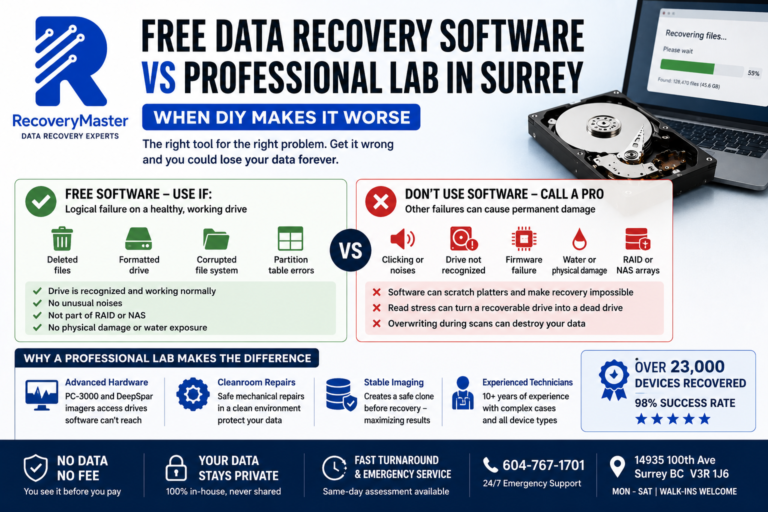
A standard computer repair shop may run consumer-grade recovery software on a failing drive. This works in a narrow set of circumstances — accidental deletion on a healthy drive, for instance. But the moment a drive has physical damage, firmware failure, or significant bad sectors, consumer software doesn’t just fail to recover your data. It can actively make the situation worse by repeatedly reading a damaged drive until it stops responding entirely.
What Makes a Certified Recovery Lab Different
Professional data recovery requires:
- Clean room environment for drives with physical damage (head crashes, platter damage). Even a single dust particle can cause additional damage to an exposed platter.
- Professional imaging tools — specifically the Ace Lab PC-3000 and DeepSpar Disk Imager — that handle failing drives cautiously, mapping bad sectors and adjusting read strategies in real time.
- Specialist NAND extraction equipment for SSD and flash memory failures where the controller chip has failed.
- Firmware-level access to drives that appear completely dead to any operating system.
- RAID and NAS reconstruction capability for multi-drive arrays that have failed.
The data recovery lab in Surrey BC at RecoveryMaster uses all of these tools, on every appropriate case. These aren’t premium add-ons — they’re standard practice.
Over 10+ years and 23,000+ devices recovered, with a 98% success rate and 200+ five-star Google reviews, RecoveryMaster has built a track record that Langley residents can verify before they even pick up the phone.
How to Get Your Device to Our Surrey Lab From Langley
Getting your device to us from anywhere in Langley is simpler than most people expect. Here are the most common routes our Langley clients use:
From Walnut Grove or Fort Langley: Take the Fraser Highway (Highway 1A) westbound. The drive is approximately 18–22 minutes under normal traffic conditions. Our lab at 14935 100th Ave, Surrey is easily accessible from the Fraser Highway.
From Langley City or Willowbrook: Head north on 200th Street, connect to the Fraser Highway westbound toward Surrey. Typically 15–20 minutes.
From Murrayville or Brookswood: Take 200th Street north to the Fraser Highway, then west. Approximately 20–25 minutes depending on traffic.
From Aldergrove: Take Highway 1 westbound or the Fraser Highway westbound. Approximately 25–30 minutes.
Walk-in appointments are welcome Monday through Saturday. No advance booking required — though calling ahead to 604-767-1701 ensures we’re ready for your case when you arrive.
Pro Tip: If your device is a hard drive making unusual sounds — clicking, grinding, or beeping — place it in a padded bag or wrap it in a clean cloth and keep it as still as possible during transport. Avoid laying it flat in a car seat where vibration from the road transfers directly to the drive mechanism. Upright, cushioned, and stationary is safest.
What to Do Before You Leave Langley — The First Hour Matters
The steps you take in the first hour after data loss have a direct impact on your recovery chances. Here’s exactly what to do before you load the device into your car.
If it’s a hard drive (inside a laptop or desktop):
- Stop using the computer immediately
- If the drive is making clicking or grinding sounds, power the machine off
- Do not run disk repair tools, antivirus scans, or recovery software
- Do not defragment the drive
If it’s an external hard drive or USB:
- Disconnect it from all computers immediately
- Do not plug it into another computer to “try again”
- If it fell or was knocked off a surface, note this — physical impact matters for the diagnostic
If it’s a phone or tablet:
- Do not try to charge it if it was water-damaged
- Do not put it in rice — this is a persistent myth that wastes time and can delay treatment
- Power it off if it’s still on
- Remove the SIM card if accessible, but don’t attempt further disassembly
If it’s a NAS or RAID:
- If it’s showing a degraded or failed status, power it down cleanly
- Do not initiate a rebuild or replacement sequence
- Do not reset to factory settings
⚠️ Warning: The single most damaging thing you can do after data loss is keep using the affected device. Every read and write operation after a failure risks overwriting the data you’re trying to recover. Stop, power down, and bring it in. The device can be replaced. The data can’t be recreated.
The Langley data recovery service at RecoveryMaster handles every device type listed above — and the diagnostic is completely free, so there’s no cost to finding out exactly what’s recoverable.
Devices We Recover for Langley Clients — Every Day
Langley is a mix of residential areas, agricultural land, industrial zones, and growing commercial districts. The devices we recover reflect that diversity.
Personal Devices
Laptops — Dell XPS and Inspiron, HP Pavilion and Envy, Lenovo ThinkPad and IdeaPad, Apple MacBook Air and MacBook Pro. Failures include accidental deletion, corrupted file systems, SSD failure, water damage, and impact damage.
Smartphones — iPhones from families across Walnut Grove and Willowbrook, Android devices from Samsung Galaxy series and Google Pixel. Most common causes: broken screen with data still needed, water damage, failed update, and device theft requiring data extraction.
External hard drives — WD My Passport and My Book, Seagate Backup Plus and Expansion, Toshiba Canvio. These drop off desks and fail. They’re also the most commonly mishandled after failure — plugged in repeatedly, which accelerates damage.
USB flash drives and SD cards — memory cards from cameras, flash drives with irreplaceable work documents. These are physically small and often physically damaged.
Business Devices
Desktop workstations — HP and Dell towers running Windows Server or standard Windows. Often contain years of business documents and QuickBooks data.
NAS devices — Synology DS series and QNAP TS series are particularly common from Langley’s Township businesses and home offices. RAID failure on a NAS is among the most urgent cases we handle.
RAID arrays — small businesses in Langley City and the Township’s commercial areas frequently run RAID 5 arrays for local file storage. When these fail — especially during or after a second drive failure — the data loss is severe and urgent.
For all of these, professional data recovery in Langley starts with the same free diagnostic, the same professional tooling, and the same No Data No Fee guarantee.
What Happens During Your Free Diagnostic
When you arrive at our Surrey lab from Langley, here’s exactly what to expect.
Arrival and intake (15 minutes) Your device is logged into our system with a documented chain of custody record — every case gets this, without exception. You describe what happened, what you need recovered, and what you’ve done with the device since the failure.
Initial assessment (same day in most cases) Our engineers inspect the device physically and electronically. For a hard drive, this includes listening behaviour, SMART data analysis (a self-monitoring system built into most drives), firmware communication, and a sector scan assessment. For an SSD, we check the controller, NAND status, and encryption state. For a phone, we assess the board and storage chip condition.
Honest outcome discussion We tell you exactly what we found, what’s likely recoverable, and what the recovery will involve. We don’t create urgency or overstate the problem. If a device is likely unrecoverable — which is rare, given our 98% success rate — we tell you that too.
Written quote You receive a written quote for the recovery. No hidden fees. No surprises.
Your decision You decide whether to proceed. There is zero obligation. The diagnostic costs you nothing regardless of what you decide.
The certified recovery and repair lab in Surrey operates this way on every single case — from a Langley resident’s water-damaged iPhone to a Township business’s failed QNAP NAS.
Can’t Drive? Mail-In Recovery for Langley Residents
Some situations make the drive inconvenient — or the device is already packaged and ready to ship. Mail-in recovery works well for most device types.
Here’s how to do it safely:
For hard drives and SSDs: Place the drive in a zip-lock bag, then wrap it in at least two inches of bubble wrap or foam padding. Place it in a rigid cardboard box — not a padded envelope. Mark the box “FRAGILE – Electronic Component.” Use a tracked courier service (Canada Post Xpresspost, FedEx, UPS) to ship to:
RecoveryMaster 14935 100th Ave Surrey, BC V3R 1J6
For laptops and phones: If the device is still physically intact (not cracked or broken open), ship the entire device in its original box if available, or a well-padded rigid box. Do not ship a device that has physically broken components that could move around in transit.
For NAS devices: Ship the entire unit if possible — the drive order and controller configuration can assist with recovery. If shipping individual drives, note the bay number of each drive on the bag clearly.
Contact us at hi@recoverymaster.ca before shipping so we can prepare for your specific case type. Once received, your case is processed with the same priority as an in-person drop-off.
The No Data No Fee Guarantee — What It Means for Langley Clients
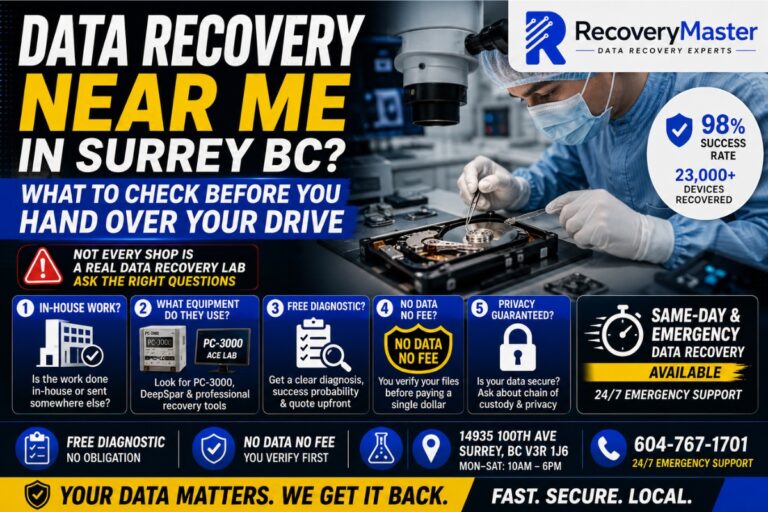
Every Langley client gets the same guarantee as every other client: you do not pay for recovery unless we successfully recover your data, and you personally verify the files before any payment is taken.
This is not a marketing phrase. It’s a documented commitment that applies to every case we take on.
Here’s what it means in practice:
- Free diagnostic — no charge to find out what failed and what’s recoverable
- Written quote — you know the exact cost before work begins
- Recovery work — performed on a drive image, never on your original device directly
- Your verification — you browse the recovered files and confirm they’re what you needed
- Payment — only after your confirmation
If we can’t recover your data, you pay nothing for the recovery. The only scenario where any cost applies without successful recovery involves cases where parts are consumed during the attempt — and this is disclosed in the written quote before work starts.
For Langley residents who’ve had bad experiences with shops that charged upfront or kept money after failing to recover data, this model is a significant difference.
Frequently Asked Questions
1. What should I do the moment I lose access to my data in Langley?
Stop using the device immediately. If it’s a hard drive making unusual sounds, power the machine off. Don’t run recovery software, don’t keep restarting, and don’t plug it into other computers to test it. Every action on a failing drive risks further data loss. Package the device safely and either drive to our Surrey lab or contact us to arrange mail-in. The sooner you stop using it, the more recovery options remain available.
2. How much does data recovery cost in Surrey BC?
Recovery costs vary by failure type and device. Logical recoveries — deleted files, formatted drives — are typically lower in cost. Physical hard drive failures requiring clean room head replacement are priced higher due to the specialist work involved. SSD and NVMe recovery depends on whether NAND chip extraction is needed. At RecoveryMaster Surrey BC, the diagnostic is always free and you receive a written quote before any work starts. You never pay without a successful result.
3. How long does data recovery take for Langley clients?
Most cases are completed within 2–5 business days. Simple logical recoveries can sometimes be faster. Complex physical cases — head replacement, multi-drive NAS reconstruction — may take longer. Emergency priority service is available for urgent cases. Call 604-767-1701 to discuss your timeline and we’ll give you a specific estimate for your device and failure type. Langley clients can also arrange remote verification of recovered files if returning to Surrey is inconvenient.
4. Can you recover data from a clicking hard drive from Langley?
Yes — clicking is one of the most common cases we handle from Langley clients. Clicking almost always indicates the read/write head has failed or is physically damaged. Recovery requires replacing the head in a clean room environment, then carefully imaging the platters. The most important thing: power the drive off the moment you hear clicking and do not power it back on. Each spin-up risks additional platter scratching that permanently destroys data.
5. Can you recover a water-damaged phone or laptop brought in from Langley?
Yes. Water damage recovery is time-sensitive — bring the device in as soon as possible, ideally within 24–48 hours. Do not attempt to charge or power on the device. Do not put it in rice. Remove the battery if accessible. In many cases, even when the device itself cannot be repaired, all data can be recovered from the internal storage. Contact us immediately and we’ll prepare for your case before you arrive.
6. What does “No Data No Fee” actually mean?
It means you don’t pay the recovery fee unless we successfully recover your data — and you personally verify the recovered files before any payment is requested. Not us, not a checklist. You browse the recovered files and confirm they’re intact and usable. If recovery fails entirely, there is no recovery fee. The diagnostic is also free. Visit RecoveryMaster to understand exactly how this guarantee is structured and applied to every case.
7. Is my data kept private during recovery at your Surrey lab?
Completely. All recovery work is performed in-house at our Surrey lab — your device and data never leave British Columbia. We maintain a strict, documented chain of custody on every single case. No third parties handle your data at any point. For Langley business clients with confidentiality or regulatory requirements, we can discuss additional documentation. Your files are never retained after your case closes.
8. Can I mail my device to your lab from Langley instead of driving?
Yes — mail-in recovery works well for most device types. Pack the device in a rigid box with at least two inches of padding on all sides, use a tracked courier service, and ship to 14935 100th Ave, Surrey BC V3R 1J6. Contact hi@recoverymaster.ca before shipping so we can prepare for your specific case. Once received, your device is processed with the same priority as an in-person drop-off. Remote verification of recovered files can also be arranged.
9. Do you offer emergency or same-day data recovery for Langley clients?
Yes. Emergency and same-day service is available for urgent cases. Call 604-767-1701 any time — we offer 24/7 emergency support. Langley clients can be at our Surrey lab within 20–30 minutes from most of the city. For cases where the data is business-critical or time-sensitive, priority assessment and expedited recovery is available. Visit data recovery in Langley for more details on urgent case handling.
10. Can you recover files I accidentally deleted or a drive I accidentally formatted?
Yes — accidental deletion and accidental format are among the most recoverable situations we handle, as long as you stop using the drive immediately. Every new file you save after a deletion or format risks overwriting the data you need. Bring the device in without writing any new data to it. Recovery success rates are high for these cases — the key variable is how much the drive has been used after the loss event.
11. Can you recover data from a Synology or QNAP NAS from a Langley business?
Yes. NAS and RAID recovery is one of our most common business case types, including from Township of Langley and Langley City clients. We recover from RAID 0, 1, 5, 6, and 10 arrays, and from Synology SHR and QNAP RAID-T proprietary volumes. Do not attempt a rebuild or factory reset on a failed NAS before consulting us — these actions can permanently destroy recoverable data. Contact trusted data recovery experts in Langley BC immediately for NAS emergencies.
12. What happens if ransomware has locked files on my Langley business computer or NAS?
Disconnect the infected machine from your network immediately — physically unplug the ethernet cable. Do not pay the ransom until you’ve had a professional assess your options. Some ransomware variants have free decryption tools available. Others may have pre-encryption file remnants recoverable from unallocated disk space. We identify the ransomware variant, check all decryption resources, and assess what recovery is realistically possible — starting with a free diagnostic.
13. What equipment do you use for data recovery?
We use the Ace Lab PC-3000 for drive imaging and firmware-level repair, DeepSpar Disk Imager for carefully managing reads from mechanically failing drives, and specialist NAND extraction tools for SSD and flash memory recovery. For physical hard drive cases requiring head replacement, we work in a clean room environment. All recovery work is performed on drive images — your original device is preserved throughout. Visit the professional data recovery lab to learn more about our facility and tooling.
14. What is your success rate for Langley data recovery cases?
RecoveryMaster maintains a 98% success rate across all case types, built over 10+ years and 23,000+ devices recovered. This rate is sustained because we assess every case honestly — if recovery is unlikely due to extreme physical damage or severe data overwrite, we say so in the diagnostic rather than taking your money and failing. We’d rather give you an accurate answer upfront than a false sense of hope.
15. How do I know if my data is actually recoverable before I drive from Langley?
The free diagnostic answers this definitively — and you’re under no obligation to proceed after hearing the result. Call 604-767-1701 and describe your situation; our team can give you an initial indication over the phone before you make the drive. Signs that data is likely recoverable: the failure is recent, the device hasn’t been heavily used since the loss, and no aggressive DIY recovery has been attempted. Visit Langley data recovery service for case examples and to get in touch.
Three things to keep in mind if you’re in Langley and you’ve just lost data.
First: You don’t need a local Langley shop that handles recovery as a side service. A certified professional lab with the right tools is minutes away — and the difference in outcome between consumer-level software and professional equipment is the difference between recovered data and permanently lost data.
Second: The steps you take in the first hour matter more than anything else. Stop using the device, handle it carefully, and get it to a professional before any further damage occurs.
Third: You carry no financial risk. The diagnostic is free, the quote is written and fixed, and payment only applies after you’ve verified your recovered files yourself.
RecoveryMaster has served Langley and the broader Fraser Valley for over 10 years with a 98% success rate, 23,000+ recovered devices, and a No Data No Fee guarantee on every single case.
Call 604-767-1701 anytime — 24/7 emergency support is available. Walk-in Monday through Saturday at 14935 100th Ave, Surrey BC V3R 1J6.
Get your free diagnostic today — no cost, no pressure, just answers.
For complete details on our Langley area services, pricing, and what to bring, visit our local data recovery lab serving Langley page. Whatever happened to your device — we’re ready when you are.
FAQ — data recovery langley
How long does data recovery langley take?
Most data recovery langley cases at RecoveryMaster are completed within 24-48 hours at our Surrey lab. Emergency data recovery langley with same-day assessment available. Visit 14935 100th Ave, Surrey BC or call 604-767-1701.
How much does data recovery langley cost?
Every case starts with a free diagnostic. Upfront pricing, No Data No Fee guarantee.
Why choose RecoveryMaster for data recovery langley?
23,000+ devices recovered, 98% success rate, certified Surrey BC lab, free diagnostics, 24/7 emergency support.
Data Recovery Langley – Related Services
RecoveryMaster provides professional data recovery Langley residents trust. Our Surrey lab is just 15 minutes from Langley via Fraser Highway.
- Data Recovery Surrey – our primary lab
- Hard Drive Recovery – HDD failures
- RAID Recovery – enterprise and NAS
- Phone Recovery – iPhone, Android
For emergency data recovery Langley, call 604-767-1701 – 24/7 support.