Free data recovery software can absolutely work — but only in specific situations. Used on the wrong type of failure, it doesn’t just fail to help. It actively destroys your chances of ever getting your data back, turning a recoverable situation into a permanent one.
That’s the part the download pages don’t mention.
If you’re in Surrey BC right now, weighing whether to try Recuva, EaseUS, or Disk Drill before calling a professional, this post will help you make that decision correctly. RecoveryMaster is a certified data recovery lab at 14935 100th Ave, Surrey BC V3R 1J6, and they regularly receive drives that were damaged further by software applied to the wrong kind of failure. Over 10 years and 23,000+ devices, they’ve seen exactly what the software does — and when it helps versus when it causes permanent harm.
Free data recovery software versus a professional lab isn’t really a competition. It’s a question of matching the right tool to the right problem. Get that match wrong and the consequences are irreversible.
This post gives you the decision framework to get it right.
What Free Data Recovery Software Actually Does
Before deciding whether to use it, you need to understand what recovery software actually does — because most people have the wrong mental model.
The Mental Model Most People Have
Most people imagine data recovery software as something like a deep scan that finds “hidden” files — as if deleted or lost data is tucked away somewhere the normal file browser can’t see it, and the software unlocks it.
That’s not quite accurate. Here’s what’s actually happening.
What’s Really Happening
When you delete a file on a Windows or Mac computer, the file itself isn’t immediately erased. What gets deleted is the reference to the file — the entry in the file system (think of it like a table of contents) that tells the operating system where to find the file’s data on the drive.
The actual data remains on the drive, physically intact, until something new is written to that space. The drive just treats that space as “available” and may overwrite it with new data at any point.
Data recovery software scans the drive looking for these orphaned data patterns — file signatures, partial file structures — that exist without a file system reference. When it finds them, it reconstructs the files and offers to save them.
Why This Only Works on a Functioning, Stable Drive
That scanning process requires the drive to be able to read every sector reliably. It requires the drive to be powered on, spinning, and responsive to read commands — thousands of them, in sequence, across the entire storage surface.
For a healthy drive that has had files deleted accidentally, this works well. The drive is stable, the reads succeed, and the software finds what it’s looking for.
For any other failure type, the story changes dramatically — and that’s where the danger begins.
For data recovery in Surrey where the failure type is unclear, RecoveryMaster’s free diagnostic identifies exactly what’s wrong before any decision about software or professional recovery is made.
The Four Failure Types — and Which Ones Software Can Handle
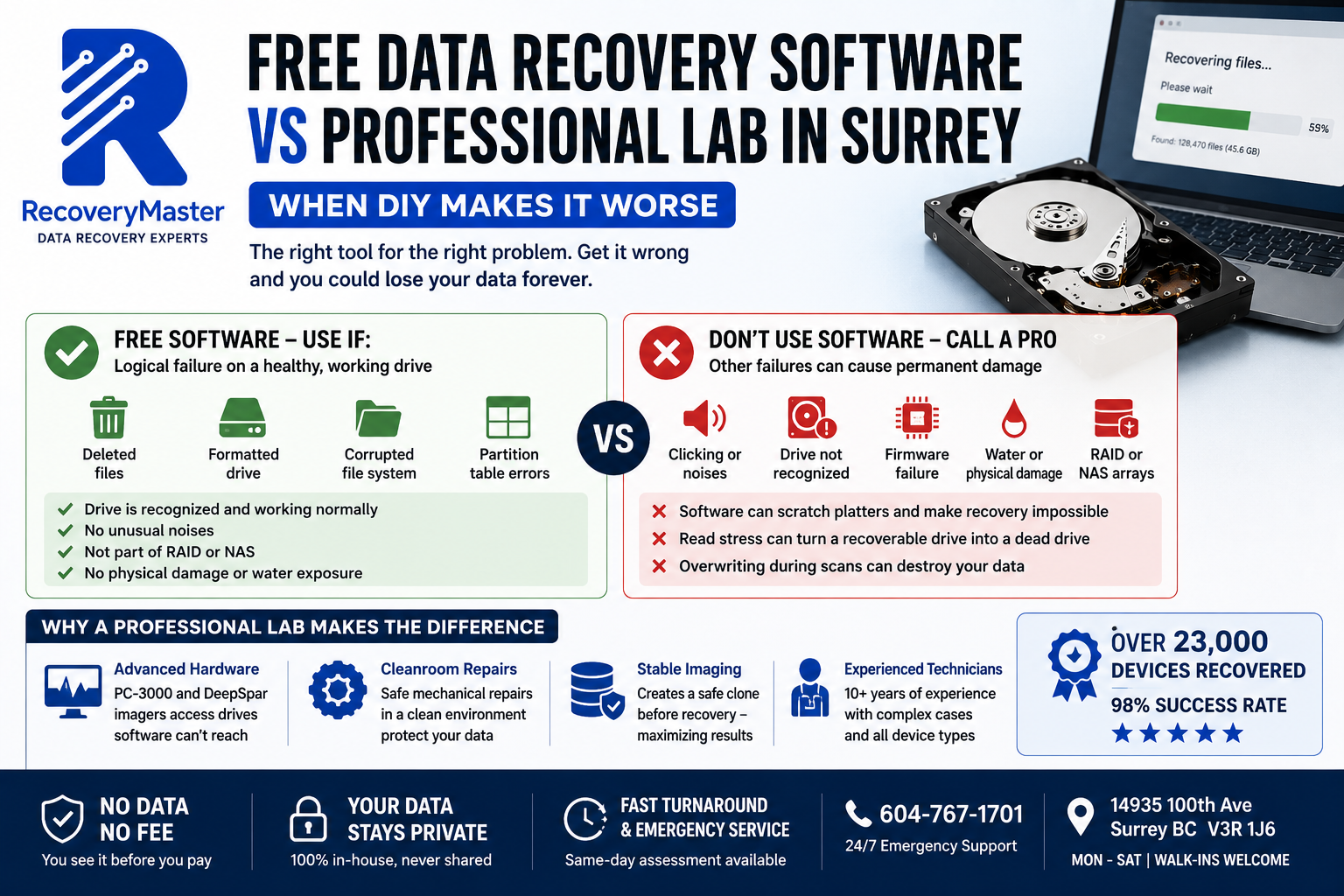
This is the most important framework in this entire post. Every data loss situation falls into one of four categories. Software helps in exactly one of them.
Failure Type 1: Logical Failure — Software’s Home Territory
A logical failure means the drive is physically healthy but something has gone wrong at the software or file system level. Examples:
- Accidentally deleted files
- Accidentally formatted a drive or partition
- Corrupted file system from an improper shutdown
- Partition table errors
- Files lost after a failed OS update
In all of these, the drive spins normally, responds to commands, and can be read reliably. The data is physically present — it just can’t be found through normal means because the file system reference is gone.
This is exactly what recovery software is designed for. Recuva, EaseUS Recovery Wizard, Disk Drill, and TestDisk all perform well on logical failures with a stable, physically healthy drive.
> Pro Tip: Before running any recovery software on a drive with a logical failure, clone the drive first if possible — create a sector-by-sector copy and run the software on the copy, not the original. This protects the original in case the software causes any issues. A professional lab does this as standard procedure.
Failure Type 2: Mechanical Failure — Software’s Danger Zone
A mechanical failure means a physical component inside the drive has broken. The most common example is a failed read/write head — the component that floats above the spinning platters and reads your data.
Signs of mechanical failure:
- Clicking, grinding, or beeping sounds from the drive
- Drive not recognized by the computer at all
- Drive recognised but immediately disconnects
- Extremely slow response followed by error messages
This is where recovery software causes serious damage.
When software tries to scan a drive with a failed read/write head, it sends the drive thousands of read commands. The failing head tries to execute each one — scraping, resetting, retrying. Each failed read attempt causes the damaged head to make contact with the platter surface. Over time, this contact scratches the magnetic surface where your data lives.
Scratched platters are unrecoverable. No professional lab — anywhere in the world — can retrieve data from physically scratched platters. The software didn’t just fail to help. It destroyed the data permanently.
> ⚠️ Warning: If your drive is making any clicking, grinding, or rhythmic beeping sound, do not connect it to a computer and do not run any recovery software. Power it off immediately and contact a professional lab. Every read attempt on a mechanically failing drive risks permanent platter damage.
Failure Type 3: Firmware Failure — Software Can’t Reach This Level
Firmware is the internal software that runs on the drive itself — the code that tells the drive how to function, how to interpret read/write commands, and how to manage its own surface. When firmware corrupts, the drive may spin up but not be recognized by the computer, or may be recognised with an incorrect capacity, or may respond with errors to every command.
Consumer recovery software cannot access or repair firmware. It operates at the file system level — one layer above where firmware problems exist. Running Recuva on a firmware-failed drive accomplishes nothing and risks triggering further error states.
Firmware recovery requires tools like the Ace Lab PC-3000 — which can communicate with the drive at the hardware level, bypass the corrupted firmware module, and restore the drive to a state where imaging can proceed.
Failure Type 4: Physical Damage — Software Is Irrelevant
Water damage, fire damage, physical impact, or electrical surge damage falls outside anything software can address. The damage is at the hardware level — corrosion on circuit boards, shorted components, physically deformed platters.
In these cases, the drive needs physical repair before any software interaction is possible. Connecting a water-damaged drive to a computer and running software on it risks short circuits, further corrosion, and component failure that locks out recovery permanently.
The Surrey data recovery service at RecoveryMaster handles all four failure types in-house — with the right approach for each one, rather than defaulting to a single tool regardless of the situation.
The Specific Ways Software Makes Things Worse
Beyond the mechanical failure scenario already described, there are several specific mechanisms by which recovery software actively damages your recovery chances.
Mechanism 1: Read Stress on a Degrading Drive
Even drives that aren’t making obvious clicking sounds can be in a state of degraded mechanical health — sectors that are marginal, heads that are weakening. A full software scan puts those drives under sustained read stress. Marginal sectors that might have been successfully read by careful professional imaging tools — which retry with different parameters and speed — fail permanently under the blunt read demands of consumer software.
Mechanism 2: Overwriting During the Scan
When recovery software finds files, it needs to save them somewhere. If you save them to the same drive you’re recovering from — which some people do, not realising the risk — you’re overwriting the very data you’re trying to recover. Even saving to a different partition on the same physical drive carries this risk.
Always save recovered files to a completely separate physical drive. This is non-negotiable.
Mechanism 3: Waking a Sleeping Problem
Some drives with firmware issues or developing mechanical failures are in a borderline state — they mount on the computer and appear functional, but are actually close to complete failure. Running a full recovery scan is exactly the stress that pushes them over the edge.
RecoveryMaster’s Surrey lab handles cases like this regularly — drives that “seemed fine” until a software scan ran, after which they became completely unresponsive. The software didn’t cause the underlying problem, but it accelerated it at the worst possible moment.
Mechanism 4: RAID Configuration Disruption
If you have a RAID array (multiple drives working together as a single storage system) — from a Synology or QNAP NAS, for example — running any software on individual drives can disrupt the RAID metadata. RAID systems write configuration information across drives, and a software scan that modifies or overwrites this metadata can prevent the array from being reconstructed correctly.
Never run data recovery software on individual drives from a RAID array without professional guidance.
When to Definitely Use Software — and How to Do It Safely
This isn’t anti-software. Software is the right tool for the right problem — and here’s how to use it correctly.
The Go Checklist: Use Software If All of These Are True
- The drive is not making any clicking, grinding, or beeping sounds
- The drive is recognized normally by the computer
- The drive doesn’t disconnect or cause errors during normal use
- The failure is clearly logical — deleted files, formatted partition, corrupted file system
- The drive is not part of a RAID or NAS array
- The drive has not been exposed to water, physical impact, or electrical surge
If every item on this list applies, software recovery is reasonable to try. Recuva (free, Windows) and TestDisk (free, Windows/Mac/Linux) are solid starting points for logical recoveries.
The Stop Checklist: Call a Professional Instead If Any of These Are True
- Any unusual sound from the drive — clicking, grinding, beeping, whirring
- Drive not recognized by the computer, or recognised intermittently
- Drive was physically dropped, exposed to water, or affected by a power surge
- Drive is part of a RAID or NAS array
- Drive is an SSD that simply stopped working without warning
- Previous software recovery attempt failed or partially completed
If any item applies, stop. Don’t run another scan. Contact a professional lab for an assessment before anything else is tried.
The professional data recovery lab at RecoveryMaster offers a completely free diagnostic — no obligation, no cost — so you know exactly what you’re dealing with before making any decisions.
What a Professional Lab Does That Software Can Never Do
Understanding the tools available to a professional lab helps explain why they can succeed where software fails.
Hardware-Level Communication: The PC-3000
The Ace Lab PC-3000 is a hardware platform — not software — that communicates with a failing drive at the firmware level. It can bypass normal command pathways, access and repair corrupted firmware modules, work with drives that no operating system will recognise, and log every read attempt with granular control over retry behaviour.
When a drive is in a fragile state, the PC-3000 can be configured to attempt each sector once, slowly, with zero stress — a fundamentally different approach from software that hammers the drive with thousands of rapid sequential reads.
Stable Imaging: The DeepSpar
The DeepSpar disk imager creates a sector-by-sector clone of a damaged drive with intelligent error handling. Instead of failing on a bad sector and stopping, it maps around problem areas, continues imaging what can be read, and returns to problem sectors with adjusted parameters. This maximises what’s recovered from a degrading drive before it fails completely.
Software running on a standard computer doesn’t have this level of control. When a consumer operating system encounters read errors from a failing drive, it behaves in ways that are harmful — retrying aggressively, triggering head resets, or unmounting the drive entirely.
Cleanroom Access for Mechanical Repairs
When a mechanical failure requires physical repair — head replacement, platter cleaning, motor repair — a professional lab with a cleanroom can open the drive safely. A single dust particle on a platter causes head contact, the equivalent of a crash landing on a surface at 7,200 RPM.
Software can never help you here. This is exclusively the domain of professional recovery, and for customers across Newton, Guildford, Whalley, Fleetwood, Cloverdale, and South Surrey, RecoveryMaster handles exactly these cases in-house — no outsourcing, no shipping to another province.
The Real Cost Comparison: Free Software vs Professional Lab
The appeal of free software is obvious: it costs nothing. But the cost calculation changes when you consider what happens when software is used on the wrong failure type.
When Software Works: Cost Is Low, Outcome Is Good
If you have a logical failure on a healthy drive and the software recovers your files — total cost is zero, and the outcome is excellent. This is the scenario software is optimised for, and in these cases, trying software first is completely reasonable.
When Software Fails Silently: Cost Is Just Time
If you have a logical failure, try software, and it doesn’t find your files — you haven’t necessarily made things worse. The drive is still in the same condition. A professional lab can still attempt recovery. You’ve lost time, but not opportunity.
When Software Causes Permanent Damage: Cost Is Everything
If you have a mechanical or firmware failure, try software anyway, and the drive sustains platter damage or the heads fail completely — the data is gone. Permanently. No professional lab can help at that point.
The “free” software just cost you everything you were trying to recover.
This is why the failure type diagnosis matters so much before any action is taken. The trusted data recovery experts in Surrey BC offer a free diagnostic specifically so you can know which category you’re in before touching anything.
Frequently Asked Questions
1. What should I do immediately after losing data before trying any software?
Stop using the device and don’t write anything new to it. If the drive is making unusual sounds, power it off immediately. If it’s a logical failure — deleted files, formatted drive — you can try software, but clone the drive first if possible. If there’s any doubt about the failure type, call a professional for a free assessment before running any software. The wrong approach applied to the wrong failure type can make recovery permanently impossible. When in doubt, act cautiously — not quickly.
2. How much does professional data recovery cost in Surrey BC compared to free software?
Free software costs nothing upfront but carries the risk of permanent data loss if applied incorrectly. Professional recovery at RecoveryMaster starts with a free diagnostic — so you understand exactly what you’re dealing with before spending anything. Pricing depends on failure type and complexity. The No Data No Fee guarantee means you pay only after verifying your recovered files. For data that matters — irreplaceable photos, business records, years of work — the professional route carries zero financial risk to assess. Call 604-767-1701 for a no-pressure estimate.
3. How long does professional data recovery take in Surrey versus DIY software?
Recovery software runs for hours and sometimes returns incomplete results — then you may need to run it again with different settings. A professional diagnostic at RecoveryMaster begins the same day you walk in. Simple logical recoveries can be completed within 24 hours. Mechanical recoveries typically take 2–5 business days. Emergency and priority turnaround is available for urgent situations — call 604-767-1701 to explain your timeline. Walk-in service runs Monday through Saturday at 14935 100th Ave, Surrey BC V3R 1J6.
4. Can you recover data from a clicking hard drive that software failed on?
Possibly — but it depends on how much additional damage the software caused. If the clicking drive was put through a full software scan, the read/write heads were forced to attempt thousands of reads in a failing state, increasing the risk of platter scratches. If scratches have occurred, recovery becomes significantly harder or impossible. This is why clicking drives should never have software run on them. If you’ve already tried software on a clicking Seagate, WD, Toshiba, or Samsung drive, bring it in for a free assessment at the data recovery lab in Surrey BC — the diagnostic will determine what’s still possible.
5. Can you recover a water-damaged phone after I’ve already tried software on it?
Water-damaged phones need physical cleaning and assessment — software can’t address hardware corrosion. If you plugged a water-damaged phone in to try a backup or data transfer, the electrical exposure may have accelerated corrosion on the logic board. Bring it in as soon as possible. The Surrey data recovery service at RecoveryMaster handles water damage cases from all phone brands including Apple iPhone, Samsung Galaxy, and Google Pixel — and the free diagnostic will tell you honestly what options remain after any previous attempts.
6. What does “No Data No Fee” mean when comparing software vs professional recovery?
With software, you invest time and risk overwriting or further damaging your data — with no guarantee of outcome and no refund if it fails. RecoveryMaster’s No Data No Fee policy means you verify your recovered files before paying a single dollar. Recovery is attempted, results are presented to you for inspection, and payment is only made when you confirm your important data is there. If recovery isn’t successful, you owe nothing — including no diagnostic fee. Zero financial risk. Compare that to the hidden cost of software applied to the wrong failure type.
7. Is my data kept private if I bring it to a professional lab in Surrey BC instead of using software at home?
At RecoveryMaster, completely. All recovery work is done in-house at the Surrey lab by their own technicians. Your data never leaves British Columbia and is never shared with third parties. Chain of custody is documented on every case. Unlike using cloud-based recovery tools — some of which upload your drive image to remote servers for processing — RecoveryMaster handles everything locally, in-house, with full confidentiality. BC’s Personal Information Protection Act applies throughout. Your personal files, work documents, and sensitive data are not retained after case completion.
8. Can I mail my drive to RecoveryMaster for assessment if I’m not near Surrey?
Yes. Mail-in cases from across BC and Canada are accepted. Email hi@recoverymaster.ca before shipping to register your case and get specific packaging instructions for your drive type. For mechanically compromised drives — particularly clicking drives — ask for guidance on optimal packaging to minimise vibration risk in transit. All mail-in cases are handled in-house in Surrey — your drive is never forwarded to another lab or province. Recovery work begins at the certified recovery and repair lab in Surrey as soon as your drive arrives and is assessed.
9. Do you offer same-day or emergency professional data recovery in Surrey BC?
Yes. Emergency priority service is available with 24/7 phone support at 604-767-1701. Walk-in service runs Monday through Saturday at 14935 100th Ave, Surrey BC. Emergency cases are assessed immediately upon arrival and moved to the front of the recovery queue. If you’ve already tried software recovery and it’s failed — or if you’re uncertain whether to try software at all — call first and get a professional opinion before taking any further action. Emergency consultations are available around the clock for situations where every hour matters.
10. Can software recover accidentally deleted files or a formatted drive in Surrey?
Yes — this is exactly the scenario where software is appropriate. Deleted and formatted data remains physically on the drive until overwritten, and recovery software can find it on a stable, functioning drive. The critical rule is to stop using the drive immediately — every new file written can overwrite what you’re trying to recover. Save recovered files to a separate physical drive, never back to the same one. If software fails on a logical failure case, contact RecoveryMaster Surrey BC — professional tools have deeper scanning capabilities and can often find what software missed.
11. Can software recover data from a RAID or NAS system, or do I need a professional?
Software should not be used on individual drives from a RAID or NAS array without professional guidance. RAID systems — including Synology and QNAP NAS devices — write configuration and parity data across multiple drives. Running consumer software on individual RAID drives can disrupt this metadata and prevent the array from being correctly reconstructed. Professional RAID recovery requires understanding the array configuration — drive order, stripe size, block size — before any imaging begins. The trusted data recovery experts in Surrey BC handle all RAID configurations in-house with specialist tools and no software guesswork.
12. What happens if ransomware locked my files — can software help?
Standard data recovery software isn’t designed for ransomware and generally can’t decrypt encrypted files. Some ransomware attacks leave shadow copies or partial backups accessible — and in those cases, specialist techniques (not consumer software) can retrieve unencrypted versions. If the ransomware-affected device also has a hardware failure, that must be addressed before any decryption attempts. Contact RecoveryMaster to describe your specific situation — the free diagnostic determines what’s present and what options exist before any commitment. Ransomware cases require a nuanced approach that general recovery software simply isn’t built for.
13. What equipment does RecoveryMaster use that software can’t replicate?
The Ace Lab PC-3000 is a hardware platform that communicates with failing drives at the firmware level — bypassing corrupted firmware, accessing drives that operating systems can’t recognise, and controlling read parameters with surgical precision. The DeepSpar disk imager creates stable sector-level clones of degraded drives with intelligent error handling. Specialist NAND extraction tools enable chip-level data recovery from SSDs and phones where the controller has failed. None of this is replicable by consumer software. These tools are available at the professional data recovery lab in Surrey — the same hardware used by national recovery labs.
14. What is RecoveryMaster’s data recovery success rate in Surrey BC?
RecoveryMaster maintains a 98% success rate across all case types — including mechanical hard drive failures, SSD failures, logical errors, water damage, and RAID arrays. The 2% of unsuccessful cases almost always involve drives where software was run on a mechanically failing device, causing platter scratches before professional help was sought — or drives where overwriting occurred before any recovery attempt was made. The success rate is achievable precisely because the right tool is matched to the right failure type from the start, rather than defaulting to software regardless of the situation.
15. How do I know if my data is recoverable before spending money on professional recovery?
The free diagnostic at RecoveryMaster tells you — specifically, not generically. A technician physically assesses the drive, identifies the failure type, determines whether any software has been applied and what effect it had, and gives you a realistic recovery probability before any work begins or payment is made. The diagnostic is completely free and carries no obligation to proceed. For local data recovery lab serving Surrey customers, walk-in assessment is available Monday through Saturday. For urgent situations, call 604-767-1701 — 24/7 emergency support is available and the first step is always an honest assessment.
Make the Right Call Before You Touch Anything
Three things to carry forward from everything above.
First: Free data recovery software is the right tool for one specific scenario — logical failures on physically healthy, functioning drives. In every other scenario, it’s the wrong tool, and using the wrong tool causes permanent damage that no professional can undo.
Second: The failure type diagnosis has to come before any action. If your drive is clicking, grinding, making noise, not being recognised, or has been through physical damage — stop. Do not run software. Get a professional assessment first. It’s free and it changes everything about what options remain available.
Third: A professional diagnostic costs nothing and eliminates the guesswork entirely. You find out what’s wrong, what’s possible, and what it will cost — before committing to anything.
RecoveryMaster Surrey BC has recovered data from over 23,000 devices with a 98% success rate — including thousands of cases where software had already been tried, and a meaningful number where it hadn’t yet, which is where the best outcomes consistently happen. No Data No Fee. All work in-house. Your data never leaves BC.
Call 604-767-1701 any time — 24/7 emergency support is available. Walk in Monday through Saturday at 14935 100th Ave, Surrey BC V3R 1J6. For more on what professional recovery looks like start to finish, visit the professional data recovery in Surrey page before you make any decision.
Ready to find out exactly what’s recoverable? Get your free diagnostic today — no software needed, no risk, no obligation.
The right decision made now protects everything that matters later.